Wednesday, March 05, 2008

My blog is moved

In case you didn't noticed.. I've moved my blog to my new company that is zevenseas. You can see and check out my new blog at http://community.zevenseas.com/blogs/robin. I will not migrate my previous posts to the new blog so this blog that you are currently reading will not be deleted. So! See you at the zevenseas!

Monday, February 04, 2008

Time for a change..

It's been 3,5yrs ago since I joined Atos Origin after graduating in july 2004. A lot has happened since that time, not only professionally but also personally. During my carreer at Atos, I've met a lot of good colleagues/friends like (my fantastic people manager): Gijs, Coen, Joost, Paul, Stan, Steve, Suus, Jacques, Karlijn, Hendrik, etc.. And gained a lot of experience and knowledge and my particular interest in the product SharePoint.

So why the change? Well I was asked by Daniel McPherson to join a new company called zevenseas (yes.. no capital in the name) which is founded by Daniel himself and Hans Blaauw. So what makes zevenseas so special? I'll tell you!

  1. Being a member of elite team of SharePoint experts
  2. Being a part of something new that has the potential to become something very big in the (near) future and having the influence of creating it
  3. 4days @ the customer and 1 day 'creative learning' work ethic
  4. Having two new fantastic friends/colleagues/bosses and one more in the near future!

Pretty good points eh? ;)

So to conclude this post. I just wanted to share that this is my first official day working at zevenseas and so far I like it !

Wednesday, January 23, 2008

InfoPath FormViewer Webpart in action

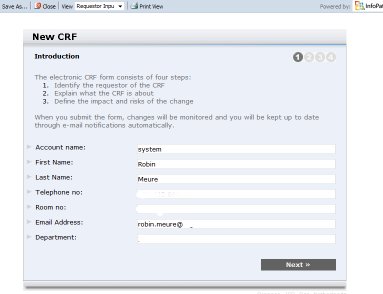
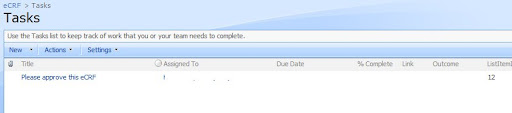
Ok so yesterday I posted what the webpart did and how it can be used. Today I'm going to show you how it actually helps the approver(s) by showing the complete process of submitting the form until the very last approval.

  • Opening up the form and fill in the data

  • Submitting the form SharePoint and check if the workflow is kicking off

  • Open up the view and check if all the columns are properly promoted. This view is also the view that is being used by the webpart

  • Go the task list and check whether a task is created for the approver

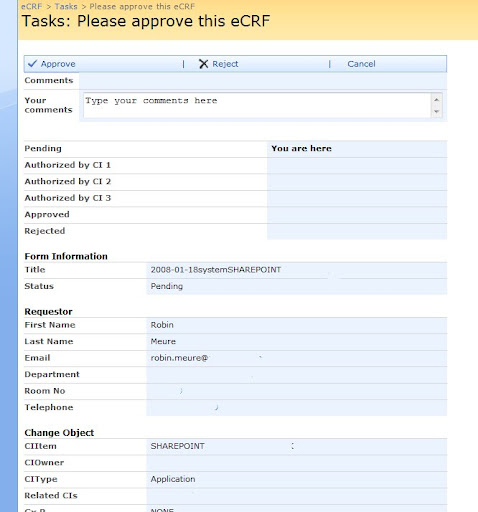
  • Open the task and see what the approver needs to approve

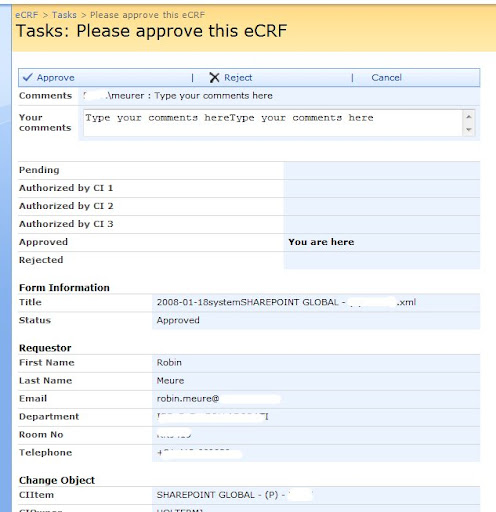
  • Approve the task. Since there is only one person who needs to approve this process for this particular eCRF, the workflow is complete and it will show in the refresh of the page.


So hopefully I have shown you the functionality and thus the benefits of using this type of way of presenting information from a InfoPath form. In the whole process the infoPath form itself is never opened so it saves a lot of clicks for the user who needs to approve this.


Technorati Tags: ,,

Tuesday, January 22, 2008

InfoPath FormViewer Webpart

It's been a while since I lasted posted and there is a very good reason for it! I will save the reason for another post in the very near future but right now I wanted to share this webpart I've been working on. As the title suggests it's a webpart that views the content of an InfoPath form. Now it's not a webpart that just renders the xsn file (like the FormViewer webpart). No, what it does is displaying all the promoted columns of a particular submitted form.

The big question is ofcourse.. "Robin.. why on earth did you build this" Well it has something to do with posts I made in the past ((Approval) Workflow thingies continued & (Approval) workflow thingies) where I copied information from the promoted columns of the form into a tasklistitem. By doing this, an user can easily see what he/she needs to approve in just one or two click(s). Now I was getting tired to copy every promoted column by hand in SPD for each Action I created per step. So I decided to build a webpart which did the following :

  • Show the promoted columns without specifying them per form
  • Show headers to group columns
  • Have the ability to Approve or Reject the form
  • (optionally) show the approver which phase of the workflow status he/she is approving

Now within defining the workflow in SPD, the only thing I need to copy each time into a new taskitem is the ID of the form and the person who must approve that step. The webpart takes care of the rest by using that information. How? Well you drag the webpart onto the 'editform.aspx' page of the task list. Using this page, it will give me the ID of the task (querystring in the URL) and by having both ID's (task and form) I can display and update the information.

Now a screenshot tells you more than a lot of words so here's what it looks like:

Pretty impresive eh? (I know I need to fix the layout;) .. Now the only input this webpart needs is the following :

  • FormLibraryName, the name of the library where the information should be fetched from
  • Name of a view, this view is being used to show the columns that you want to have in the webpart.
  • TaskName, the name of the tasklist where the tasks are created for the workflow
  • Headers, a comma separated string where you can specify where headers should be placed and what the title should be.

So how does the code look like? Well.. it's quite big so I will only post the relevant stuff.

  • Hiding the default EditForm formfield
  • writer.Write("<style>#WebPartWPQ2{display:none;}</style>");
  • Getting the reference of the taskitem and the formitem
  • SPWeb web = SPControl.GetContextWeb(Context); SPList tasklist = web.Lists[_tasklist]; SPListItem taskitem = tasklist.GetItemById(Convert.ToInt32(Page.Request.QueryString["ID"])); SPList formlist = web.Lists[_formlibrary]; SPListItem formitem = formlist.GetItemById(Convert.ToInt32(taskitem["ListItemID"].ToString()));
  • Displaying the status of the workflow by using a column named "Status" in the formlibrary
  • SPFieldChoice status = (SPFieldChoice)formlist.Fields["Status"]; writer.Write("<table cellpaddin='0' cellspacing='0' width='100%'>"); foreach (string _status in status.Choices) { if (_status == formitem["Status"].ToString()) { writer.Write("<tr><td class='ms-formlabel'>"); writer.Write(_status.ToString()); writer.Write("</td><td class='ms-formbody'>"); writer.Write("<b>You are here</b>"); writer.Write("</td></tr>"); } else { writer.Write("<tr><td class='ms-formlabel'>"); writer.Write(_status.ToString()); writer.Write("</td><td class='ms-formbody'>"); writer.Write("&nbsp;"); writer.Write("</td></tr>"); } } writer.Write("</table>");
  • Displaying all the columns based on a view. And when given, display a header
  • //Render the columns with their values based on the view that is selected writer.Write("<table cellpaddin='0' cellspacing='0' width='100%'>"); SPView view = formlist.Views[_view]; System.Collections.Specialized.StringCollection strCollection = view.ViewFields.ToStringCollection(); for (int i = 0; i < strCollection.Count; i++) { try { //For all of the headers that are typed in the properties in "1;Header,2:Header2" way we add those headers. try { string[] seperator; char[] splitter = { ',' }; seperator = _separators.Split(splitter); for (int x = 0; x < seperator.Length; x++) { string[] colom; char[] _splitter = { ';' }; colom = seperator[x].Split(_splitter); for (int y = 0; y < colom.Length; y++) { if (i == Convert.ToInt32(colom[0].ToString())) { writer.Write("<TR><td>&nbsp;</td></TR><tr><td style='font-family:verdana,arial,helvetica,sans-serif; font-size:9pt;font-weight:700;'>" + colom[1] + "</td></tr>"); } break; } } } finally { //Write all the columns that are in the view with their values writer.Write("<tr><td class='ms-formlabel'>"); if (formitem.Fields.GetFieldByInternalName(strCollection[i]).Title != null) { //ColumnName writer.Write(formitem.Fields.GetFieldByInternalName(strCollection[i]).Title); } writer.Write("</td>"); writer.Write("<td class='ms-formbody'>"); if (formitem[(strCollection[i])] != null) { //ColumnValue writer.Write(formitem[(strCollection[i])].ToString()); } writer.Write("</td></tr>"); } } catch (Exception error) { writer.Write(error.Message.ToString()); } } writer.Write("</table>");

The other code just renders the webpart properties, controls and handles the click events of the buttons.. no real rocket science there ;)


Technorati Tags: ,,

Thursday, January 03, 2008

.NET 3.5 (finally) brings some decent Active Directory support!

Back in the old days (like AD Change Password WebPart and Account locked WebPart) you had to use the "Active DS Type Library" (Interop.ActiveDs.dll) to interact with Active Directory to retrieve things like :

  • Change Password
  • Lockout Time
  • Last password change date
  • Change users password, etc

Now there is .NET 3.5 with the inclusion of System.DirectoryServices.AccountManagement! Using this piece, gone are the days when you had to invoke a property and you got a LargeInteger as a return value which you had to split up in a high and a low part and make a datetime thing out of it (see samples below to see what i'm talking about ;))

UserDiabled:

bool isDisabled; isDisabled = ((int)entry.Properties["userAccountControl"].Value & (int)ADS_USER_FLAG.ADS_UF_ACCOUNTDISABLE) != 0;

LastLogonDate:
object lastlogon = entry.InvokeGet("LastLogin");

LastPasswordChage:
LargeInteger liAcctPwdChange = entry.Properties["pwdLastSet"].Value as LargeInteger; // Convert the highorder/loworder parts of the property pulled to a long. long dateAcctPwdChange = (((long)(liAcctPwdChange.HighPart) << 32) + (long)liAcctPwdChange.LowPart); DateTime dtAcctPwdChange = DateTime.FromFileTime(dateAcctPwdChange);

Nowadays your code will look like this

PrincipalContext ctx = new PrincipalContext(ContextType.Domain, "domain", "DC=domain,DC=com"); // Create an in-memory user object to use as the query example. UserPrincipal u = new UserPrincipal(ctx); // Set properties on the user principal object. u.SamAccountName = "Robin"; // Create a PrincipalSearcher object to perform the search. PrincipalSearcher ps = new PrincipalSearcher(); ps.QueryFilter = u; PrincipalSearchResult<Principal> results = ps.FindAll(); foreach (UserPrincipal _user in results) { DateTime LastPasswordChange = _user.LastPasswordSet; DateTime LockoutTime = _user.AccountLockoutTime; DateTime ExpirationDate = _user.AccountExpirationDate; int FailedLogonAttempts = _user.BadLogonCount; bool UserDisabled = _user.Enabled; bool UserLockedOut = _user.IsAccountLockedOut; }

Pretty sweet eh? No more Googling to find out which property in AD you need to address in order to get things working :)

Thursday, December 27, 2007

A tip!

User > Robin, would you mind deleting that site for me?
Robin > No problem! What's the url again?
User > http://asdfkljasldfkj/sites/asldkfjasldkfj
Robin > Ah right! Will do!

Simple task eh on a quite day like this? I just open up the site and want to click on Site Actions > Site Settings > Delete this Site, but to my suprise.. I couldn't find the Site Actions link.. hmmmm! So I did some url hacking and placed /_layouts/settings.aspx behind the http://asdfkljasldfkj/sites/asldkfjasldkfj url, et voila I had my Site Settings page ;) Next thing to do was ofcourse..  Click on "Delete this site"..  I got prompted with a Access Denied error! Aaargh, what is going on here? I tried to logon with the service account which has (as I do) Full Control rights and I got the same Access Denied error.  Then I remembered that I locked the site using Central Admin this morning :

So I unlocked the site and got back to the site and all of a sudden there was my Site Actions button again.. needless to say that I was able to delete the site :)

Conclusion, when you are confronted with a "Reader" style view of a site where you administrative rights and get confronted with Access Denied errors, check if the site is being locked using Central Admin!


Technorati Tags:

Wednesday, December 19, 2007

Create custom site definitions which include CEWPS and using resource files for their content

Maybe my longest title for a post ever but I think it covers everything what I wanted to share with you..  In a previous post I mentioned a solution for a problem when a site template was being used with activated features that didn't provision very well. This post is about that solution ;)

It's not really difficult to create a new site definition (a lot of bloggers already paved the way for me there) but I had some difficulties adding a Content Editor WebPart (CEWP) with HTML into my definition. Since you have to replace the < and > symbols with &tl; and &gt; and you will have to put CDATA brackets around the whole thing as well. After several attempts to encode my HTML the proper way (and failing miserably), I decided to check how Microsoft put CEWP's in their site templates.. and this is how it looks:

<WebPart xmlns:xsi="http://www.w3.org/2001/XMLSchema-instance" xmlns:xsd="http://www.w3.org/2001/XMLSchema" xmlns="http://schemas.microsoft.com/WebPart/v2"> <Title>$Resources:spscore,ReportCenterOnet_CEWP_Title;</Title> <FrameType>TitleBarOnly</FrameType> .. <Assembly>Microsoft.SharePoint, Version=12.0.0.0, Culture=neutral, PublicKeyToken=71e9bce111e9429c</Assembly> <TypeName>Microsoft.SharePoint.WebPartPages.ContentEditorWebPart</TypeName> <ContentLink xmlns="http://schemas.microsoft.com/WebPart/v2/ContentEditor" /> <Content xmlns="http://schemas.microsoft.com/WebPart/v2/ContentEditor">$Resources:spscore,ReportCenterOnet_CEWP_Content;</Content> <PartStorage xmlns="http://schemas.microsoft.com/WebPart/v2/ContentEditor" /> </WebPart>

"$Resources:spcore, ReportCenterOnet_CEWP_Content", that's all the content they put in there! No encoded HTML with CDATA brackets at all! So what does it mean then? Well.. i'll tell you!

  • $Resources : here they are referring to the fact that the content is placed in the Resources folder (/12 hive/Resources)
  • spcore : here they are referring to which file the content is placed in
  • ReportCenterOnet_CEWP_Content : here they are referring to which value in the file must be used

So when we open up the spcore.xml file and find look for the "ReportCenterOnet_CEWP_Content" value, it looks like this :

<Data Name="ReportCenterOnet_CEWP_Content"> <Value>&lt;DIV class="ms-vb"&gt; &lt;SPAN class="ms-announcementtitle"&gt;Report Center features include:&lt;/SPAN&gt; &lt;UL&gt; &lt;LI&gt;&lt;A title="" href="../Lists/Sample KPIs/KPIListViewPage.aspx" target=""&gt;Key Performance Indicators&lt;/A&gt; (KPIs) enable you to communicate goals, trends and track progress.&lt;/LI&gt; &lt;LI&gt;&lt;A title="" href="../ReportsLibrary/sample dashboard.aspx" target=""&gt;Dashboards&lt;/A&gt; enable you to give a more detailed explanation of your information using Excel workbooks and KPIs. Dashboard filters make it easy to select a range of information to view. To create your own dashboard go to the &lt;A title="" href="../ReportsLibrary/Forms/scsummpg.aspx" target=""&gt;Dashboards&lt;/A&gt; view of the Reports library and click 'New'.&lt;/LI&gt; &lt;LI&gt;The &lt;A title="" href="../ReportsLibrary/forms/current.aspx" target=""&gt;Reports&lt;/A&gt; library is designed to store files containing reports and dashboards and allow easy access to information from previous time periods.&lt;/LI&gt; &lt;/UL&gt; &lt;SPAN class="ms-announcementtitle"&gt;To prepare this Report Center for use, the following actions are suggested:&lt;/SPAN&gt; &lt;UL&gt; &lt;LI&gt;View the sample &lt;A href="../ReportsLibrary/sample dashboard.aspx"&gt;dashboard&lt;/A&gt; and &lt;A title="" href="../ReportsLibrary/sampleworkbook.xlsx" target=""&gt;workbook&lt;/A&gt; to understand some of the capabilities of this Report Center&lt;/LI&gt; &lt;LI&gt;If the samples do not work correctly ask an administrator to ensure that Excel Services are enabled and that this Report Center is a Trusted Location&lt;/LI&gt; &lt;LI&gt;If you plan to use Excel to analyze information from existing data servers, create and upload data connection (ODC) files to the &lt;A title="" href="../Data Connections" target=""&gt;Data Connection Library&lt;/A&gt;. If you want users to create new KPI Lists then add them to the "Owners" group. Users in the "Members" group can edit pages but can not create KPI Lists.&lt;/LI&gt; &lt;LI&gt;Update or remove sample content&lt;/LI&gt; &lt;/UL&gt; &lt;/DIV&gt;</Value> </Data>

So it seems you still have to encode your HTML but you don't have to worry about CDATA stuff :) The question is, why should you use the same technique as Microsoft does ?

  • Makes the ONET.XML more 'readible' and thus easier to maintain
  • No more messing around where to put the CDATA stuff
  • One place to maintain the content of your CEWPs

Hope this gives you more insight about creating and defining site definitions as it did to me ;)


Technorati Tags:

SharePoint Perfomance tuning using IIS Overlapped Recycling

In case you didn't notice there is a new blogger in town called Steve Sheppard (an Escalation Engineer at MS (he also wrote the whitepaper about Understanding the Explorer View about a year ago)) and he covers some pretty serious topic and that is the feature of IIS 6.0 called "Overlapped Recycling' and why you should use it! So go out and check the following posts :

Overlapped Recycling And SharePoint

Overlapped Recycling And SharePoint- The Generic Value Of Overlapped Recycling

Overlapped Recycling And SharePoint- Why SharePoint Requires It

Overlapped Recycling And SharePoint- Memory Based Recycling

Overlapped Recycling And SharePoint- Scheduled Recycling

I really love this stuff! :) So thanks Steve!


Technorati Tags: ,

Thursday, December 13, 2007

The workflow failed to start due to an internal error

I got that error emailed to me from a customer who just had his new site and was playing around with the new workflow functionality. Needless to say that he was quite disappointed :) So I went to check it out.. First thing I did was to reproduce the problem and funnily enough I also experienced the same error as he did (don't you just love the errors that are reproducible!). Next thing was to create a new custom workflow on that list to see if the error still occurred.. and it did. Next thing to do was to create a new workflow on a new list.. same result.. Then I deactivated (all of) the workflow features.. reactivated them again.. error solved!

In order to really identify and solve the problem I created a new site, based on the same site template and added a workflow to a document library.. started off an approval workflow and guess what.. I experienced the same error. So I created another site, based on another site template and there I noticed it didn't have any workflows activated. So as you might have guessed.. no problems at all when I activated them and created a new workflow.

Now to explain some things about our custom site templates. These are created using the old trick 'Save as template" and then making them available using STSADM. Now the site template is causing the problems had already, during the creation, the workflow features activated. So it seems that during the creation of new a site using that template, the features are not provisioned as they should and therefore are not working properly. That would explain the deactivating and reactivating of the feature to make it work again..

Solutions?

  • Create them by copying the STS folder and modify the ONET.XML file and activate the (workflow) features
  • Use the "Save as template" thing with all the (workflow) features deactivated and create a custom event handler to activate them during the creation of a new site


Please note that this error occurred on a pre-SP1 environment.

Technorati tags: ,

Thursday, December 06, 2007

Our worries are over!

I think I've lost count how many times I asked myself or let other people ask themselves.. "Is it possible to migrate content from a list to another list while maintaining the metadata in an easy way without using the "Manage content structure link" because I can't/don't want to use the publishing feature.." Ok, ok.. not exactly that question but you get the point ;) Well fortunately Chris O Brien has released a tool on codeplex that does exactly that ! Introducing the SharePoint Content Deployment Wizard. Chris says the following about it :

".. The tool provides a wizard-like approach to deploying content between SharePoint sites. The selected content is exported using the Content Migration API (PRIME), giving a .cmp file (Content Migration Package) which can be copied to other servers.."

I tested it by exporting a list from site A and then importing it on site B and it worked perfectly! All the custom metada, versions and more importantly the 'modified by', 'created by' , 'modified' and 'created' columns were still intact! So I'm very impressed! :)


Technorati tags: , ,

Tuesday, December 04, 2007

Very interesting book!

Clicking through links on my favorite blogs (yes.. once a time I actually visit the blogs I read in my RSS reader) I stumbled upon the blog of Richard Taylor who is a SharePoint engineer at Microsoft. In his second post he writes about an upcoming book which working title is "Microsoft Office SharePoint Server 2007 Engineering and Architecture Resource Kit".

Here is a snippet of his post that really captured my attention and explains why this book makes it to my personal no1 'must-read/have' ;)

...a text that will be the prescriptive guide to architecting and engineering a successful, large-scale implementation of MOSS 2007--written by Microsoft Architects and Engineers.  There are a number of books out there that speak to both WSS and MOSS.  All of them are for *Administrators*, the emphasis being on Administration.  This book will be a 'nuts-and-bolts' text of the "why" more than "how".  The book will be similar to a "Notes from the Field" but from an Engineer's perspective, not an administrator; a book on “How Microsoft does IT...


Technorati tags:

Friday, November 30, 2007

Getting InfoPath attachments from a submitted form

This week I was not only busy with migrating old portals and solving problems but I was also busy with creating a console application that does the following :

  • Extract the attachments from a submitted InfoPath form and uploading those into a document library and return the links from the documents

Ofcourse this requirement is so generic that I had to be out there on our beloved world wide web ;) And luckily.. it was.. partly..! I found the following pieces of invaluable information: Upload an InfoPath attachment to a document library by Koen Roos and KB892730: How to encode and decode a file attachment programmatically by using Visual C# in InfoPath.

First things first.. what is Koen talking about in his post? Well he references another post that describes how you can generates classes out of your XML file. Since all submitted InfoPath forms are purely XML you can generate classes from it as well! So how does it work then?

  • Download a copy of a submitted form to your development machine
  • Run the Visual Studio Command line
  • Execute the following cmd : XSD "name of the submitted form"
  • Execute the following cmd : XSD "name of the created XSD file" /CLASSES
  • Open Visual Studio and open up your workflow project (see previous posts about how-to-do this)
  • Add the just created .cs file to your project
  • Then you can use code to get access to the values from the infopath fields in an OO way
System.Xml.Serialization.XmlSerializer xSerializer = new System.Xml.Serialization.XmlSerializer(typeof(myFields));
myFields res = (myFields)xSerializer.Deserialize(str);
Console.WriteLine(res.FirstName);

Where MyFields is the main datasource in my InfoPath form, so now when I want to access a particular field within my datasource I can use "res.AttachmentField" or "res.FirstName" to get the values. Now to get the binary data from the attached files I used the code from the KB article that can encode and decode the string and that will look like this :

InfoPathAttachmentDecoder dec = new InfoPathAttachmentDecoder(r.AttachmentField);

Now to put that back into a document library as a document we do the following

SPFolder AttachmentStore = web.GetFolder("Document Library");
AttachmentStore.Files.Add(dec.Filename, dec.DecodedAttachment);


To put it al together it will look like (so you can copy/paste it more conveniently ;))

SPSite site = new SPSite("http://portal/sites/subsite");
SPWeb web = site.OpenWeb();

SPFile file = web.GetFile(@"http://portal/sites/subsite/Document Library/form.xml");
System.IO.StreamReader str = new System.IO.StreamReader(file.OpenBinaryStream());
System.Xml.Serialization.XmlSerializer xSerializer = new System.Xml.Serialization.XmlSerializer(typeof(myFields));
myFields res = (myFields)xSerializer.Deserialize(str);

InfoPathAttachmentDecoder dec = new InfoPathAttachmentDecoder(res.AttachmentField);
SPFolder AttachmentStore = web.GetFolder("Document Library");
AttachmentStore.Files.Add(dec.Filename, dec.DecodedAttachment);

Now the next step is to make a custom workflow activity using this code.. but I will save that for another post ;)


Technorati tags:

File not Found errors after migrating a 2003 portal

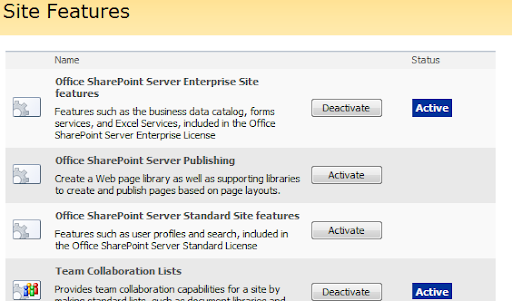
During an (vanilla) upgrade of a 2003 portal, the upgrade process automatically turns every area and subarea into publishing webs. Sometimes the provisioning of this feature does not work as it should and therefore when you land on a page you automatically receive the File Not Found error.


So what should you do to solve this problem?

  • Well.. paste "/_layouts/settings.aspx" after the url of the web (eg http://portal/subsite/_layouts/settings.aspx).
  • Click on Site Features and there you will see that the Publishing feature isn't activated.
  • Activate the feature (to let it know that it is a publishing web so we can deactivate it)
     
  • Deactive the feature (let it remove all the previously provisioned bindings)
  • Activate the feature again (perform this operation to let it provision again freshly)

Problem solved!


Technorati tags: ,

Wednesday, November 28, 2007

The specified web does not contain a reporting metadata list.

I got this error on all our extranet sites when I opened up the Audit Log Reports within Site Settings

The specified web does not contain a reporting metadata list.   at Microsoft.Office.RecordsManagement.Internal.Utility.UniqueListManager.GetList(String strSaveName, SPWeb webSaveLocation, Boolean fThrowIfNotFound, Ids messageOnError) 
   at Microsoft.Office.RecordsManagement.Internal.Utility.UniqueListManager.GetList(String strSaveName, SPWeb webSaveLocation, Ids messageOnError) 
   at Microsoft.Office.RecordsManagement.Reporting.ReportingGallery.ReportingGalleryConstructor(SPWeb web) 
   at Microsoft.Office.RecordsManagement.Reporting.ReportingGallery..ctor(SPSite site) 
   at Microsoft.Office.RecordsManagement.Reporting.ApplicationPages.RunReports.OnLoad(EventArgs e) 
   at System.Web.UI.Control.LoadRecursive() 
   at System.Web.UI.Page.ProcessRequestMain(Boolean includeStagesBeforeAsyncPoint, Boolean includeStagesAfterAsyncPoint) 

Now there a couple of things that these sites have in common :

  • they all have the same features activated
  • they have all been migrated from WSSv2 to WSSv3
  • they all are based on the Meeting Workspace template (MPS)

First thing I did was activating all sorts of MOSS features, both on sitecollection and site level. That did not work..
Second thing I did was creating a new sitecollection using the meeting workspace template and opened up the Audit Log Reports.. that did not work..
Thirdly I created a new sitecollection using the basic teamsite template and then opened up the Audit Log Reports.. and.. it worked!

So back to our intranet where hopefully we can reproduce the error we have :

  • migrated sites from WSSv2 to WSSv3
  • migrated and new sites based on the Meeting Workspace Template (MPS)
  • migrated and new sites based on the Basic Team Site (STS)

It failed for all the sites that used the MPS template and it worked for all the sites that used the STS template!

Googling the subject only returned results that the reporting feature was not properly provisioned for custom site templates:
Inside a Support Incident- SharePoint site templates and auditing, the quickfix he provides involves using STSADM to force the activation of the Reporting feature on the sitecollection. Unfortunately this does not fix our problem..

I will keep you posted about the solution!

Monday, November 26, 2007

Incoming E-mail functionality in Enterprise environments?

An user at the customer where I'm working at the moment asked the functional application manager of our SharePoint environment whether is was possible to enable the incoming e-mail functionality. So the question was dropped by me and I was going to investigate the matter.. I knew of the existence but never seen it live before so I googled on it and found the following useful information :

SharePoint 2007 - Incoming Email by Neil Thompson

Here's a snippet of Neil's post:

This is where I recommend you start, read all this stuff first, before you race off back to your Virtual Machines.

  1. Plan incoming e-mail (Office SharePoint Server)
  2. Configure incoming e-mail settings (Office SharePoint Server)
  3. In addition to the technet site, a very good place to start is
    1. How to configure email enabled lists in Moss2007 using Exchange 2003
    2. How to configure email enabled lists in Moss2007 using Exchange 2007
  4. Read these documents and set it up in a lab exactly as described until it works
  5. Now introduce incremental changes to the infrastructure and after each one, verify that email is still getting through, or not.

Following his advice I opened up the links and documentation and was horrified to find out that the first step in How to configure email enabled lists in Moss2007 using Exchange 2003 states "Let's get the Active Direcrory ready!". Now summing up that step I came to the following conclusion : if you want to make this work in an Exchange environment you've got to create a separate OU in AD. If my conclusion is right, it's no big deal for smaller companies where Active Directory isn't that big and some customizations can be made in an easy way and matter. But in my case, we are talking about an enterprise level customer..  Now there are several arguments why I dare not to ask the guys who administer AD to create an extra OU.

  • Farm level enabling or disabling the functionality (it's not a feature you can turn on or off on site (collection) level)
    • Given the fact we have more 600 site-collections (excluding sub-sites) you don't want to know the number of lists that could be e-mail enabled..
  • Wild growth in that particular OU we cannot manage (sizing, naming conventions, etc)
  • Wild growth in Outlook mailbox per user (forwarding rules from SharePoint to users and vice-versa)

So.. I must say it's really nifty feature.. unfortunately not very suitable in environments like these.. (or is there something I'm not aware of and I miss here?)


Technorati tags: ,

Friday, November 16, 2007

The life of a SharePointer is hard (sometimes)

This last week, Murphy paid me and my colleague a visit. During his visit he helped to bring down our extranet and our intranet environment. 

Extranet environment
On this environment all of a sudden we couldn't add users to Active Directory anymore. Also users could not change their password (using my excellent webpart) so I checked what was wrong with the server. It soon became clear that the particular server could not connect to the domain controller. The odd thing was that the domain controller was pingable so the two servers could see each other. When I pinged again a different IP address was returned.. so I pinged again and again and again.. to my surprise every time when I pinged I got a different IP address. The cause of this was a wrong setting in the DNS. The first address was of the proper virtual LAN and then address that was returned came from the 2nd virtual LAN that is only being used for backup procedures. So we asked the infra guys if they could fix this error since this 'glitch' since it was causing more problems as well. One more serious than the first I described like that the database server could not authenticate our service account. And we all know what happens if SharePoint cannot contact the database server..

As soon as that was fixed our intranet environment went down..

Intranet environment
After facing some performance issues we followed the guidelines by Joel for Application pools. And well.. just read the post at Sharepoint Application pool settings- update
Short conclusion : check REQUEST QUEUE LIMIT instead of uncheck the damn thing ;)

And then.. when all things were solved we got a call from support that our extranet environment could not accessed through the internet..

Sigh.. I guess it's love / hate thing :)

Friday, November 09, 2007

Want to use DPM?

Make sure that the servers you want to protect (in our case the SharePoint servers and database servers) have the following updates and patches applied to them :

SharePoint

Database

Also, run the DPM Server on a standalone server because DPM cannot protect itself as it can protect the other servers in your farm.

Want InfoPath forms with custom lookup dialogs?

Then check out Serve's PlugIt- Extend InfoPath browser form with custom lookup dialogs post (even featuring with a how-to movieclip!). This is some great news as I made a bet with him that this kind of customization was not possible and he'd proven me wrong ;) Now you can use custom webpages for looking up information and return those values into the fields on your form. You might wonder why you would want this.. imagine a dropdownlist on your form that is being populated from a webservice and returns more than 1000 items, this is not very user friendly now is it? So you create a custom webform where you can do some advanced searching/querying and return the result into the form :)


Technorati tags: , ,

Wednesday, November 07, 2007

Minor migration problems pt2

this is a follow up from Minor migration problems, in that post I described how to quickly address this error using the toolbar-flip technique. Now this is ofcourse not really an option if you have a lot sitecollections and subsites. So I decided to create a console application that checks every site and modifies the toolbar...

So my first idea was to programmatically  create the toolbar-flip technique. Googling I found a topic that covered just this thing : Update ListViewWebPart to Remove or Hide Toolbar ToolbarType= None. Reading through that thread and trying the samples that were given there, I managed to flip the toolbar from Summary to None to Full. Unfortunately only the setting of the toolbar was flipped, not on the webpart itself, so the link was not recreated. Bugger.. but I was on the right track :)

It became obvious to use the reflection technique in combination with the SPView that is associated with a ListViewWebPart (see the thread about the details). I became curious how SharePoint rendered the Toolbar string for the "Summary toolbar" using the new (and thus proper) way and the old way.

Old Way:

<HTML><![CDATA[ <table width=100% cellpadding=0 cellspacing=0 border=0 > 
<tr> <td colspan='2' class='ms-partline'><IMG SRC='/_layouts/images/blank.gif' 
width=1 height=1 alt=''></td> </tr> <tr> <td class='ms-addnew' 
style='padding-bottom: 3px'> <img src='/_layouts/images/rect.gif' alt=''>&nbsp;
<a class='ms-addnew' ID='idAddNewDoc' href=']]>
</HTML><URL Cmd='New' /><HTML>?RootFolder=</HTML><GetVar Name='RootFolder'
 URLEncode='TRUE' /><HTML><![CDATA[' ONCLICK='javascript:NewItem(']]>
</HTML><URL Cmd='New' /><HTML>?RootFolder=</HTML><GetVar Name='RootFolder' 
URLEncode='TRUE' /><HTML><![CDATA[', true);javascript:return false;' target='_self'>]]
></HTML><HTML>Add new document</HTML><HTML><![CDATA[</a> </td> </tr> 
<tr><td><IMG SRC='/_layouts/images/blank.gif' width=1 height=5 alt=''></td></tr> </table>]]></HTML>

New Way:

<IfHasRights><RightsChoices><RightsGroup PermAddListItems="required"
 /></RightsChoices><Then><HTML><![CDATA[ 
<table width=100% cellpadding=0 cellspacing=0 border=0 > <tr> 
<td colspan="2" class="ms-partline"><IMG SRC="/_layouts/images/blank.gif" 
width=1 height=1 alt=""></td> </tr> <tr> <td class="ms-addnew" 
style="padding-bottom: 3px"> <img src="/_layouts/images/rect.gif" alt="">
&nbsp;<a class="ms-addnew" ID="idAddNewDoc" href="]]></HTML>
<HttpVDir /><HTML><![CDATA[/_layouts/Upload.aspx?List=]]></HTML>
<ListProperty Select="Name" /><HTML><![CDATA[&RootFolder=]]>
</HTML><GetVar Name="RootFolder" URLEncode="TRUE" /><HTML>
<![CDATA[" ONCLICK="javascript:NewItem(']]></HTML><HttpVDir />
<HTML><![CDATA[/_layouts/Upload.aspx?List=]]></HTML>
<ListProperty Select="Name" /><HTML><![CDATA[&RootFolder=]]>
</HTML><GetVar Name="RootFolder" URLEncode="TRUE" />
<HTML><![CDATA[', true);javascript:return false;" target="_self">]]>
</HTML><HTML>Add new document</HTML><HTML>
<![CDATA[</a> </td> </tr> <tr><td>
<IMG SRC="/_layouts/images/blank.gif" width=1 height=5 alt="">
</td></tr> </table>]]></HTML></Then></IfHasRights>

Seeing this, it was pretty clear to just modify the Toolbar string from the SPView. Check the code below on how I did this :

static void Main(string[] args)
{
   SPWebApplication wa = SPWebApplication.Lookup(new Uri(@"http://webapplication"));
   //Loop through all the sitecollections within the webapplication
   foreach (SPSite site in wa.Sites)
   {
       //Loop through all the subsites within the sitecollection
       foreach (SPWeb web in site.AllWebs)
       {
           try
           {
               //Open up the default.aspx page to retrieve all the webparts
               SPLimitedWebPartManager WPColl = web.GetLimitedWebPartManager("default.aspx", System.Web.UI.WebControls.WebParts.PersonalizationScope.Shared);
               //Loop through every webpart in the collection
               foreach (Microsoft.SharePoint.WebPartPages.WebPart wp in WPColl.WebParts)
               {
                   if (wp is Microsoft.SharePoint.WebPartPages.ListViewWebPart)
                   {
                       //Extend the properties of the webpart using the ListViewWebPart class
                       ListViewWebPart ListViewWp = (ListViewWebPart)wp;

                       //Only change the properties if this is a document library since all the other webparts like Tasks, Links use other links (they use newform.aspx instead of upload.aspx)
                       if (web.Lists[new Guid(ListViewWp.ListName.ToString())].BaseTemplate == SPListTemplateType.DocumentLibrary)
                       {
                           try
                           {
                               //Got this piece of code from https://forums.microsoft.com/MSDN/ShowPost.aspx?PostID=1946546&SiteID=1&pageid=0 by Bruce VB and Eugen Lechner
                               System.Reflection.PropertyInfo ViewProp = ListViewWp.GetType().GetProperty("View", System.Reflection.BindingFlags.NonPublic | System.Reflection.BindingFlags.Instance);
                               SPView spView = ViewProp.GetValue(ListViewWp, null) as SPView;

                               //The old and inproper links begin with the <HTML> bit first where as the proper link begins with <IfHasRights>
                               if (spView.Toolbar.StartsWith("<HTML>"))
                               {
                                   //I write out the url of the web and which document library for troubleshooting in case something does go wrong
                                   Console.WriteLine(web.Url.ToString());
                                   Console.WriteLine("Modifying: " + wp.Title.ToString());
                                   //The toolbar is being updated with the proper link
                                   spView.Toolbar = @"<IfHasRights><RightsChoices><RightsGroup PermAddListItems='required' /></RightsChoices><Then><HTML><![CDATA[ <table width=100% cellpadding=0 cellspacing=0 border=0 > <tr> <td colspan='2' class='ms-partline'><IMG SRC='/_layouts/images/blank.gif' width=1 height=1 alt=''></td> </tr> <tr> <td class='ms-addnew' style='padding-bottom: 3px'> <img src='/_layouts/images/rect.gif' alt=''>&nbsp;<a class='ms-addnew' ID='idAddNewDoc' href=']]></HTML><HttpVDir /><HTML><![CDATA[/_layouts/Upload.aspx?List=]]></HTML><ListProperty Select='Name' /><HTML><![CDATA[&RootFolder=]]></HTML><GetVar Name='RootFolder' URLEncode='TRUE' /><HTML><![CDATA[' ONCLICK='javascript:NewItem(']]></HTML><HttpVDir /><HTML><![CDATA[/_layouts/Upload.aspx?List=]]></HTML><ListProperty Select='Name' /><HTML><![CDATA[&RootFolder=]]></HTML><GetVar Name='RootFolder' URLEncode='TRUE' /><HTML><![CDATA[', true);javascript:return false;' target='_self'>]]></HTML><HTML>Add new document</HTML><HTML><![CDATA[</a> </td> </tr> <tr><td><IMG SRC='/_layouts/images/blank.gif' width=1 height=5 alt=''></td></tr> </table>]]></HTML></Then></IfHasRights>";
                                   spView.Update();
                               }

                           }
                           catch (Exception _error)
                           {
                               Console.WriteLine(_error.Message.ToString());
                           }
                       }

                   }
               }

               //If a meeting workspace is used, there is more than just 'default.aspx'. So we have to check the rest of the pages as well
               if (web.WebTemplate == "MPS")
               {
                   //The rest of the pages are kept in the "pages" folder
                   SPFolder srcFolder = web.Folders["pages"];
                   foreach (SPFile file in srcFolder.Files)
                   {
                       //Here we get the webparts from those specific pages
                       SPLimitedWebPartManager pagescollection = web.GetLimitedWebPartManager("pages/" + file.Name.ToString(), System.Web.UI.WebControls.WebParts.PersonalizationScope.Shared);
                       foreach (Microsoft.SharePoint.WebPartPages.WebPart _webpart in pagescollection.WebParts)
                       {
                           if (_webpart is Microsoft.SharePoint.WebPartPages.ListViewWebPart)
                           {
                               ListViewWebPart ListViewWp = (ListViewWebPart)_webpart;

                               if (web.Lists[new Guid(ListViewWp.ListName.ToString())].BaseTemplate == SPListTemplateType.DocumentLibrary)
                               {
                                   try
                                   {
                                       Guid webPartGuid = new Guid(((Microsoft.SharePoint.WebPartPages.ListViewWebPart)ListViewWp).ViewGuid);
                                       System.Reflection.PropertyInfo ViewProp = ListViewWp.GetType().GetProperty("View", System.Reflection.BindingFlags.NonPublic | System.Reflection.BindingFlags.Instance);
                                       SPView spView = ViewProp.GetValue(ListViewWp, null) as SPView;

                                       if (spView.Toolbar.StartsWith("<HTML>"))
                                       {
                                           Console.WriteLine(web.Url.ToString());
                                           Console.WriteLine(file.Name.ToString());
                                           Console.WriteLine("Modifying: " + _webpart.Title.ToString());

                                           
                                           spView.Toolbar = @"<IfHasRights><RightsChoices><RightsGroup PermAddListItems='required' /></RightsChoices><Then><HTML><![CDATA[ <table width=100% cellpadding=0 cellspacing=0 border=0 > <tr> <td colspan='2' class='ms-partline'><IMG SRC='/_layouts/images/blank.gif' width=1 height=1 alt=''></td> </tr> <tr> <td class='ms-addnew' style='padding-bottom: 3px'> <img src='/_layouts/images/rect.gif' alt=''>&nbsp;<a class='ms-addnew' ID='idAddNewDoc' href=']]></HTML><HttpVDir /><HTML><![CDATA[/_layouts/Upload.aspx?List=]]></HTML><ListProperty Select='Name' /><HTML><![CDATA[&RootFolder=]]></HTML><GetVar Name='RootFolder' URLEncode='TRUE' /><HTML><![CDATA[' ONCLICK='javascript:NewItem(']]></HTML><HttpVDir /><HTML><![CDATA[/_layouts/Upload.aspx?List=]]></HTML><ListProperty Select='Name' /><HTML><![CDATA[&RootFolder=]]></HTML><GetVar Name='RootFolder' URLEncode='TRUE' /><HTML><![CDATA[', true);javascript:return false;' target='_self'>]]></HTML><HTML>Add new document</HTML><HTML><![CDATA[</a> </td> </tr> <tr><td><IMG SRC='/_layouts/images/blank.gif' width=1 height=5 alt=''></td></tr> </table>]]></HTML></Then></IfHasRights>";
                                           spView.Update();
                                       }

                                   }
                                   catch (Exception _error)
                                   {
                                       Console.WriteLine(_error.Message.ToString());
                                   }
                               }

                           }

                       }
                   }
               }
           }

           catch (Exception error)
           {
               Console.WriteLine(error.Message.ToString());
           }

           finally
           {
               web.Dispose();
               web.Close();
               site.Close();
               site.Dispose();
           }
       }
   }
}

So my thanks go out to Bruce VB and Eugen Lechner for guiding me in the right way ! :)


Technorati tags: , , ,